
Laurel Denise Luna Review: Why I'm Switching My Work Planner
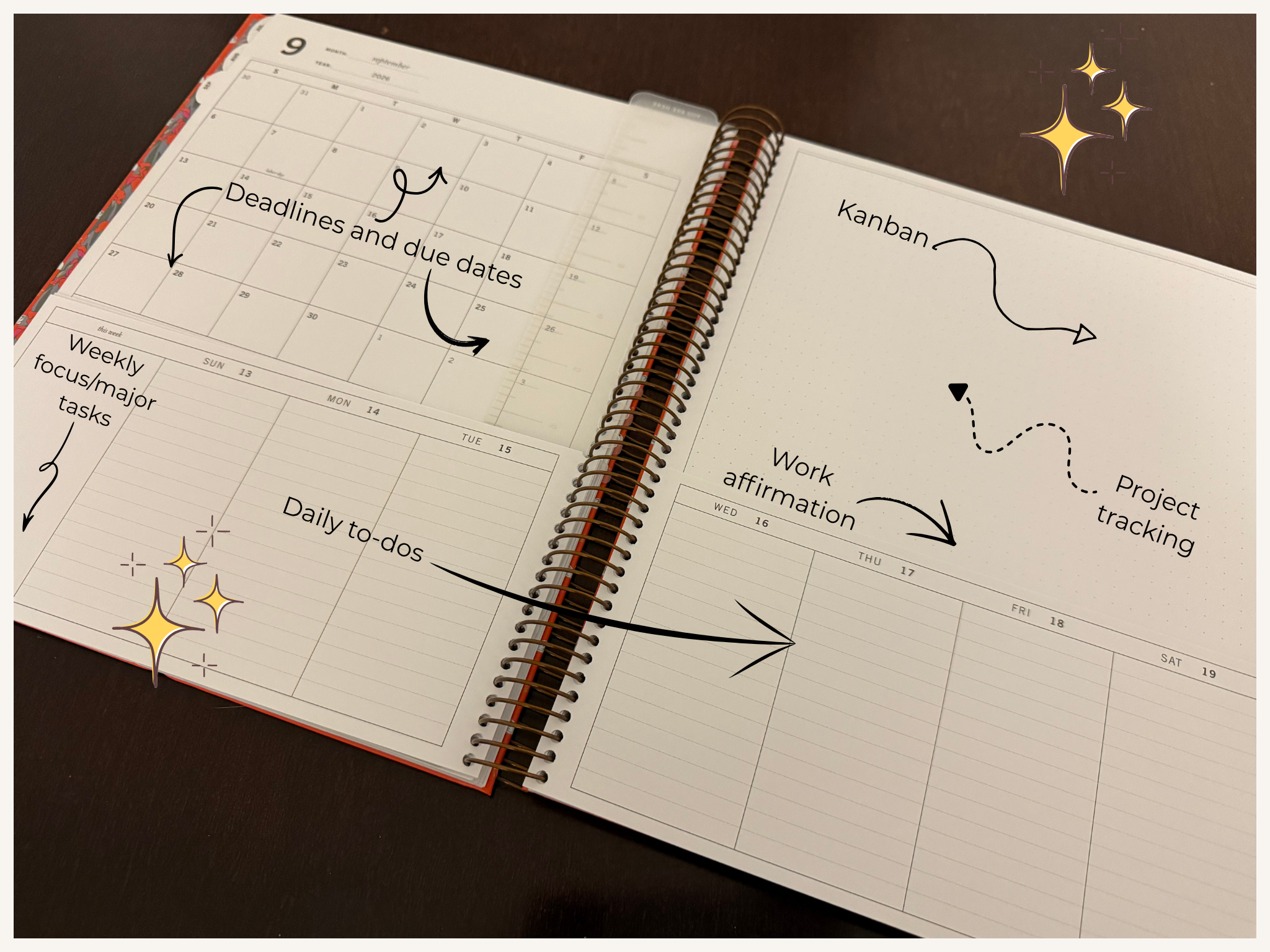
How I plan to use the Luna for work as a product manager
This post contains affiliate links. If you buy through them, I earn a small commission at no extra cost to you. I only link to things I actually use. Thank you for using my link. ❤️I have been reevaluating my whole planning system lately, which feels right on schedule. Planner season is in full swing, everyone is posting their setups, and I always end up looking at my own with fresh eyes around this time of year.
The thing I kept landing is: my work planner is not working!
So I'm switching. The Erin Condren Daily Duo is coming off my desk and the Laurel Denise Luna is taking its place.
Here's my thought process, including the parts I'm unsure about.
At a Glance
Planner: Laurel Denise Luna
Layout: Full monthly view on one page, weekly plans, dedicated full dot grid dashboard/notes page
Best for: List makers, note takers, project trackers, people who hate flipping pages
Not ideal for: Detailed daily time blockers, Scout lovers who need the weekday columns to align across the month and weeks
My use case: Work planner for product management
Code: IMPERFECT10 for 10% off at Laurel Denise
Why the Daily Duo Stopped Working For Me
Let me say the good part first…The paper quality of Erin Condren is incredible. Unmatched. Genuinely some of the best paper I have had the pleasure of writing on. I’ll keep incorporating Erin Condren notebooks in my system, if anything just to keep writing on the paper. 😅
I'm leaving because I cannot stand flipping pages. I knew this, but I tried it anyway, and I just can’t stand it. At least not long term.
I would spend real time writing down due dates and deadlines on the monthly view, and then that information just would not transfer to my weeks and days the way I wanted and needed it to. The month became a page I filled in and then never looked at again. All that effort, sitting there, invisible.
The other piece is time blocking. I have a lot of set meetings and a fairly same-y daily routine, so writing out my schedule every single day started to feel like duplication. The Daily Duo gives you all that daily space, and I just didn’t end up needing it like I originally thought.
The Daily Duo would make a great catch-all planner. For work, it's a bit too much. And honestly, I love my Laurel Denise Anne too much to move it into that role, so the Anne stays exactly where it is.
About the Laurel Denise Luna Layout
The Luna keeps your monthly calendar, your weekly plans, and a dedicated dot grid notes section visible together. Without the flipping (other than each week). I think that’s why it and the Scout are so loved!
It's for people who want space to write things out, not just space to schedule. Lists, project notes, running reminders, etc.
For anyone that wants the month and the week in the same eyeline, this is definitely the layout!
Laurel Denise Luna vs. Scout: The Difference
If you have been comparing layouts, the Luna and the Scout feel similar at first. Same at-a-glance idea and same size.
The difference is where the month sits. On the Luna, you get the full monthly calendar on the left side page with the dot grid panel on the right side page. In the Scout, the month is split across the two pages of the spread.
That one page month is what I wanted. But it comes with a tradeoff.
On the Luna, the days of the week on the monthly calendar don’t line up with the days of the week on the weekly pages. If you're someone who reads down the page and expects Tuesday to sit above Tuesday, that can be a bummer. It's not a dealbreaker for me, but certainly something that can help you decide when choosing between the two.
Both layouts are worth looking at side by side before you commit. Whichever one you land on, code IMPERFECT10 gets you 10% off!
I have actually used the Scout for a full year, so I am not guessing here. If you want the long version, here is my Laurel Denise Scout review after twelve months of real use. The short version is that the Scout gives you more monthly real estate and clean weekday alignment, and the Luna trades some of that away for a full page to write on.
| The Luna | The Scout | |
|---|---|---|
| Where the month sits | Full monthly calendar on the left side page, dot grid panel on the right side page. | The month is split across the two pages of the spread. |
| Weekday alignment | Days of the week on the monthly calendar do not line up with the days on the weekly pages. | Weekday columns align across the month and the weeks. |
| Notes space | Dedicated full dot grid dashboard and notes page. | No full dot grid panel. The second page goes to the monthly calendar. |
| Size | Same size as the Scout. | Same size as the Luna. |
| Best for | List makers, note takers, project trackers, people who hate flipping pages. | Planners who need the month and the week to read down the page in the same columns. |
| Not ideal for | Detailed daily time blockers, and Scout lovers who need the weekday columns to align. | Anyone who wants a one page month with open space to write things out. |
Both layouts are worth looking at side by side before you commit. Whichever one you land on, code IMPERFECT10 gets you 10% off at Laurel Denise.
How I'm Setting It Up For Work
I'm a product manager, so my brain is holding a lot of parallel threads at once. I can be A LOT of context switching. Here's what I’m looking at tracking in the Luna:
Due dates and deadlines. These are the most important things on my calendar and they need to be prominent.
Features going live. Dates, dependencies, the stuff I need to see from a top level view.
Things to watch and monitor. Post-launch, post-release, anything sitting in a state where I need to check in and follow up.
Discovery. Ongoing, messy, constantly changing in terms of priority and can feel like it takes forever to finish for those larger features and projects.
General project tracking. I often have multiple projects in flight at any given time.
The dashboard/notes dot grid page is where all of that goes. I'm planning to run it kanban style, or possibly as a big list area for each in-flight project. I want to try both before I decide.
Another thing that is going on that page will be a personal reminder and affirmation to thwart pesky imposter syndrome.
Meeting notes are staying out of the planner for now. Those go on a notepad and get transferred digitally, which is a workflow I am not messing with. The notepad in question is one I made, because I could not find one that did exactly what I wanted. The Imperfectly Planned Meeting Notes pad is coming to the shop soon!
I fully expect things to carry over month to month. However, if something carries over for three weeks without moving, that's my cue to ask whether it actually needs to exist. Hot tip for any other corporate girls out there 💪
My Honest Hesitations
I won’t lie. Two things worry me about the layout -
Space. I'm not sure the notes space will be enough for the workload I'm carrying lately. I'm planning to solve that with inserts, and by keeping my own notepads in the mix so the planner doesn't have to hold everything. I’ll try and report back, so make sure to subscribe to my monthly newsletter, The Imperfect Spread to get that update when it comes!
Setup. This is the bigger one. I need to be intentional about where things go, and so much comes up out of the blue in my job that I have to save space for the unknown. That isn’t really a Luna problem though.
Either way I'm going in with a loose structure and deliberate white space. That is the Planirvana™ approach in practice. Peace is temporary, you check in with your system, and you keep a rhythm you can come back to. Planner season is exactly when I'm most tempted to rebuild everything from scratch, and exactly when I should be doing less of that.
Who The Luna Is For
Buy it if: you're a list maker, you track projects, you want your month visible while you plan your week, you take a lot of notes, or you have hit your limit with flipping pages.
Skip it if: you time block in detail every day, you need weekday columns to align across the month and week, or you want a planner that holds absolutely everything including your meeting notes.
The Verdict
I'm not going to pretend I have used this thing for six months. I haven't. This is the honest before. My expectations, if you will.
What would make it a win by December: consistent use, feeling on top of my projects and duties, and a general set layout that holds everything I need for a given month without me rebuilding it every four weeks.
I'll come back and update this post once I know. If the space runs out or the setup falls apart, I'll tell you that too. I’ll plan on an update in December 2026!
If you want to try the Luna yourself, code IMPERFECT10 gets you 10% off anything at Laurel Denise.
